YouTube Music
Add your private Bri Podcast link directly to your YouTube Music library.
YouTube Music can subscribe to a private RSS feed directly. You do not need YouTube Studio or email verification.
Steps
-
Sign in to Bri and copy your private Podcast link from Subscribe podcast. Do not share this link publicly.
-
Open YouTube Music Podcasts and sign in. If needed, select
Library, thenPodcasts.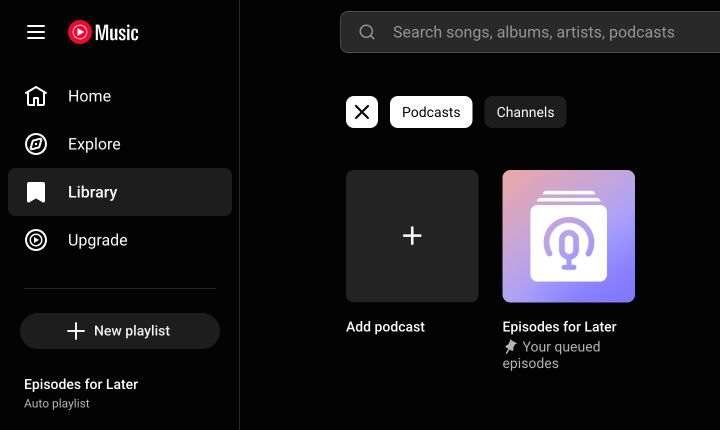
-
Select
Add podcast, then selectAdd RSS feed.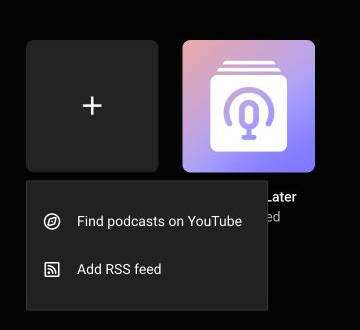
-
Paste your private Bri Podcast link into
Enter an RSS feed URL, then selectAdd.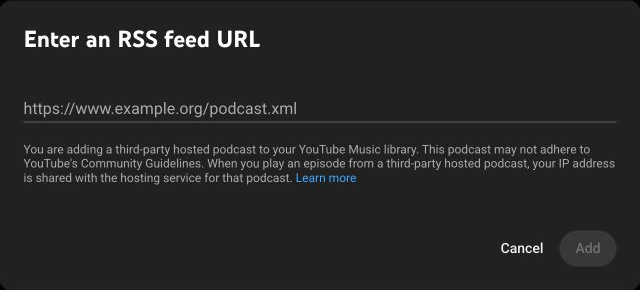
-
The podcast appears in your YouTube Music library. New episodes appear after Bri updates the feed and YouTube Music refreshes it.
This is a private library subscription. No creator dashboard or email verification is required. Keep your private Bri Podcast link secret.